
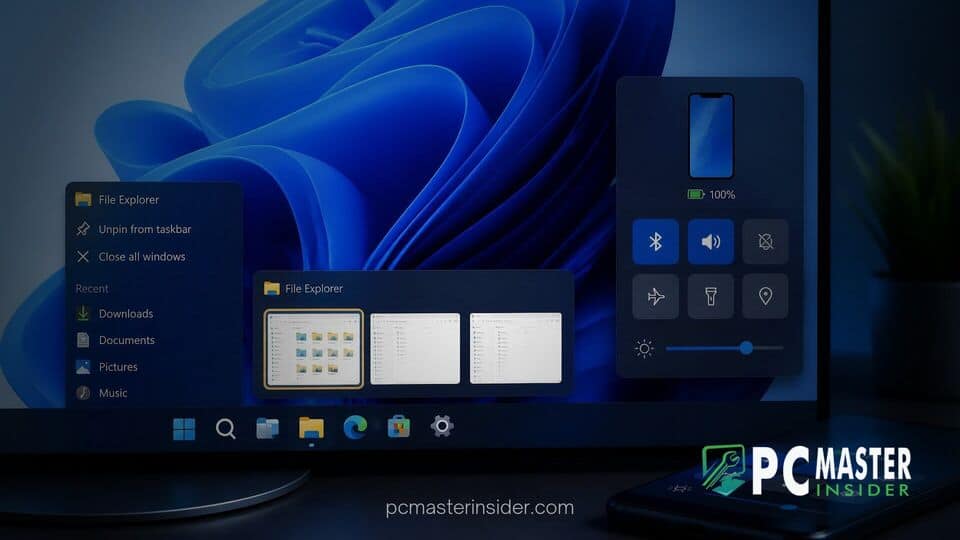
Microsoft is experimenting with prominent desktop interface changes in the latest experimental preview builds for Windows 11. The new updates give users more control over window navigation while making phone management more seamless.
The latest build features a classic text-based list view for hovered taskbar icons alongside a brand-new Mobile Devices quick action tile. These additions target everyday productivity, offering quick desktop navigation for heavy multitaskers and easier device connectivity.
windows 11 taskbar text list preview phone control
In recent Insider testing, Microsoft introduced a new option in taskbar behaviors that lets users swap thumbnail card previews for simple text lists when hovering over open applications. Concurrently, a dedicated Mobile Devices tile in Quick Settings enables instant interaction with linked Android phones, allowing users to silence notifications or ring lost handsets directly from the system tray.
Windows 11 Insider Build Introduces Compact Text Taskbar Previews
For over two decades, Windows users relied on basic textual lists to navigate between open application windows. Microsoft is bringing back this streamlined approach through a hidden option in Windows 11 Insider Preview Build 26340.9596. Located under Settings > Personalization > Taskbar, a new dropdown labeled "Show taskbar previews as" allows testers to choose between the standard Thumbnail view and a new List view.
When configured to List view, hovering over an app icon with multiple open windows displays a vertical list of page titles rather than visual miniature cards. This retro style resembles the classic window handling seen in Windows XP and Windows 7, providing a cleaner look for power users working with dozens of active tabs or document windows.
Comparing Thumbnail Hover Cards with the Classic Window Title List
Since the launch of Windows Vista and Windows 7, thumbnail hover cards have served as the default visual preview tool in the desktop environment. While visual thumbnails help identify windows visually, they consume screen space and slow down workflow when dealing with numerous similar-looking documents or coding sessions.
The compact text list layout offers several operational advantages over visual cards:
- Reduced Visual Clutter: Text lists take up significantly less desktop real estate than large image cards.
- Faster Text Scanning: Users can read precise window titles instantly without waiting for thumbnail rendering.
- Improved Performance: Text lists minimize resource overhead on lower-end hardware.
This design decision fits right alongside other recent UI overhauls. However, while Microsoft continues to modernize native apps, power users frequently track legacy features, as seen when Windows 11 WinUI modernization omits classic scrollbar options in native interfaces.
Quick Settings Tile Adds One-Click Android Phone Alerts and Ringing
Beyond taskbar modifications, the experimental update introduces a dedicated Mobile Devices control tile inside the Quick Settings flyout. Powered by the underlying Phone Link architecture, this tile acts as a rapid dashboard for connected Android smartphones.
Instead of launching the full Phone Link application, users can trigger common phone management actions right from the action center. Key functions included in the Quick Settings tile feature:
- Ring My Phone: Sounds an audible alert on a misplaced phone, even when set to silent.
- Do Not Disturb Toggle: Mutes incoming mobile calls and alerts instantly.
- Audio and Mute Controls: Adjusts phone ringer volume levels from the PC desktop.
These features build on recent efforts to improve cross-device management. They complement other system tray tools, such as when Microsoft adds a unified battery status widget to monitor connected accessories and secondary devices from a central hub.
Testing Instructions and Future Desktop Environment Updates
Currently, both the taskbar text list view and the Mobile Devices tile are being tested as experimental feature flags in Insider builds. Because these changes are undergoing phased rollout, not all Insiders see the toggles immediately in Settings. Community developers have noted that tools like ViVeTool can force-enable the flags for early evaluation.
These desktop interface experiments align with Microsoft's broader roadmap for OS flexibility and usability. Recent releases have shown a clear focus on user customization, including compact taskbar height options and flexible alignment settings. Meanwhile, as Windows 11 reaches higher global market share, refinement of everyday interface details remains crucial for retaining enterprise and legacy desktop users.
Microsoft has not confirmed an official release date for these experimental updates in general availability builds. If insider testing yields positive feedback, the compact text list view and Quick Settings phone controls could arrive in upcoming feature updates.



