
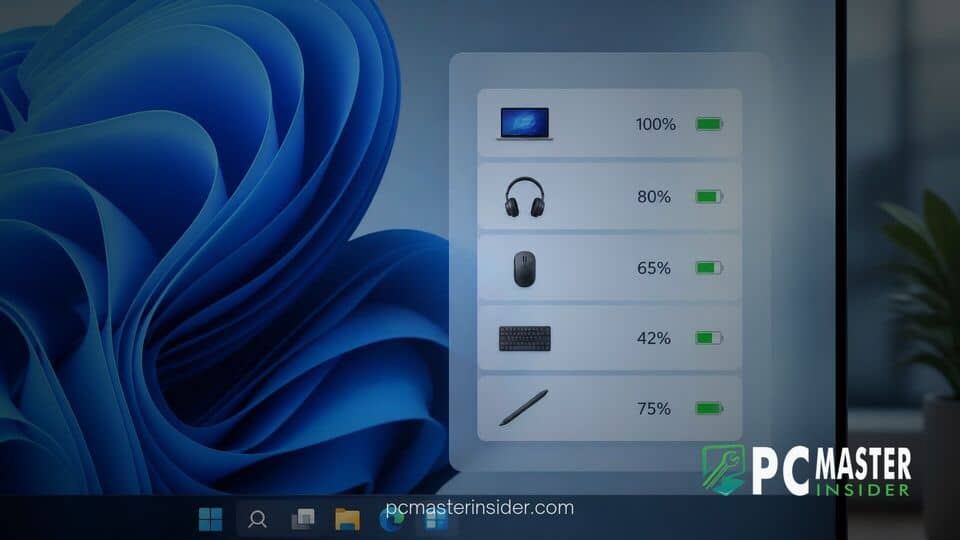
Microsoft has released a unified battery status widget for testers enrolled in the Windows Insider Program. The new utility brings real-time power tracking for host PCs alongside connected wireless peripherals into a single dashboard within the Windows 11 Widgets Board.
By consolidating power information into one place, Microsoft aims to streamline how mobile users monitor charge levels across their entire ecosystem of wireless hardware. The update comes as part of broader efforts to make system-level widgets more practical for daily desktop and laptop workflows.
New Battery Status Widget Centralizes Power Monitoring in Windows 11
The windows 11 battery status widget insider experience provides a clean, vertical readout of remaining battery capacity across supported hardware. Positioned at the top of the interface is the primary battery readout for the host laptop or tablet, followed by a list of active Bluetooth and peripheral devices. This unified view eliminates the need to navigate deep into the main Settings app or launch vendor-specific companion applications just to check accessory charge levels.
In official documentation covering the release, Microsoft noted that the widget reflects a continued commitment to making the Widgets Board more practical for everyday tasks. By bringing critical status indicators out of isolated submenus, users can quickly evaluate whether their equipment needs to be plugged in before stepping away from their desk or heading into mobile work environments.
Peripheral and Connected Device Battery Tracking
Beyond tracking internal laptop batteries, the new utility offers native visibility into connected accessories. Each entry within the card presents a dedicated icon reflecting the device type, its assigned name, the precise remaining percentage, and a charging status indicator. Supported hardware classes include Bluetooth mice, keyboards, wireless headphones, and official Surface brand accessories like the Surface Pen.
The interface automatically respects active system visual settings, seamlessly switching between dark and light themes. It also displays state indicators showing when a device is connected to active power or running in low-power modes. This approach mirrors mobile operating system features found on modern smartphones, bringing familiar multi-device battery overviews directly to the Windows desktop platform.
Improving the Windows 11 Widgets Board for Everyday Utilities
The introduction of system-level utilities marks a shifting strategy for the Windows 11 Widgets Board. Since its debut, the panel has faced criticism for leaning heavily on news aggregators and third-party content feeds rather than practical system management tools. Adding dedicated hardware indicators gives users a functional reason to incorporate the board into their routine.
This release follows several recent user experience adjustments across the operating system as Windows 11 market share continues to climb. Microsoft has actively refined system navigation across preview channels, including recent updates to Windows Share app pinning and taskbar visual tweaks. Incorporating core system telemetry into quick-access panels helps streamline daily maintenance without cluttering the main taskbar tray.
Availability and How to Access the Battery Widget in Insider Preview
The new battery widget is currently rolling out to Windows Insiders running experimental preview builds, such as Build 26340.9616. Because Microsoft employs phased feature rollouts, the widget may not appear immediately for every user on eligible test builds.
To check for and add the utility, enrolled Insiders can open the Widgets Board by pressing the Windows key + W shortcut, click the plus icon to open the widget library, choose Battery Status, and select the pin option. While initial testing centers on the main board layout, early assets discovered in preview builds suggest Microsoft may eventually extend battery widget capabilities to the Windows 11 lock screen as development progresses.
As testing continues in the preview channels, Microsoft plans to gather feedback to refine accessory support and data reporting before rolling out the feature to the broader Windows 11 user base in a future cumulative update.



