
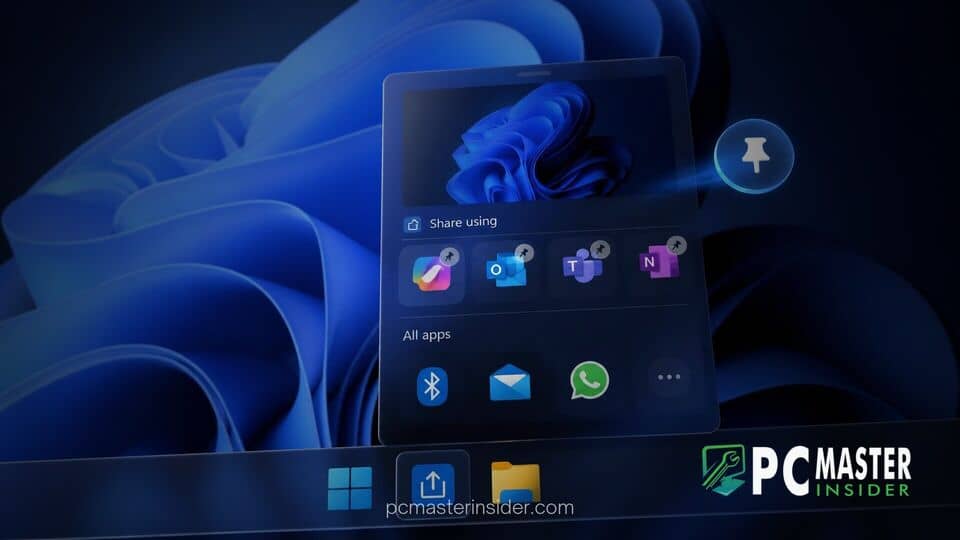
Microsoft has started rolling out a requested productivity feature to preview builds of Windows 11, introducing native app pinning capabilities directly inside the operating system's built-in Share dialog. The change gives users greater control over which target applications appear at the top of the interface when sending files, text, or links.
By default, the Windows Share window populates its application suggestions based on system defaults and recent usage patterns. The new customization capability allows users to manually lock their most frequently used communication tools, cloud services, or social platforms to the primary view, cutting down on extra clicks and scrolling.
App Pinning Introduced in Windows Share Window
Microsoft is introducing the ability to pin target applications directly within the native share interface across select Windows 11 test channels. This addition addresses long-standing user requests for better personalization within the operating system's built-in sharing ecosystem, enabling faster access to preferred messaging and sharing platforms.
How the New Customization Option Works
When opening the native Windows Share window from File Explorer, Microsoft Edge, or supported third-party apps, users will notice a new pin icon on hover over listed target applications. Selecting this option forces the selected app to remain fixed at the top of the 'Share using' list. Users can unpin items just as easily, keeping their sharing tray organized according to their individual workflow habits.
The feature aims to streamline sharing workflows for power users who rely heavily on specific communication services like Telegram, WhatsApp, or Microsoft Teams. Rather than relying on dynamic suggestions that fluctuate based on recent operating system actions, pinned items maintain a predictable placement every time the share interface is launched.
Additional System and Settings Changes in the Latest Builds
Alongside the share menu refinements, recent Windows 11 preview releases incorporate several underlying tweaks to core operating system components and settings. Microsoft routinely packages smaller utility updates into Insider builds to gather telemetry before wider general availability deployments.
These ongoing refinements build upon recent platform upgrades introduced throughout the development cycle. For instance, Microsoft officially began the rollout of Windows 11 2026 update version 26H2 earlier, bringing core stability updates alongside modular UI improvements. Additionally, enterprise management controls have seen steady evolution, such as when Microsoft auto-enabled Windows settings backup for Entra-joined PCs to protect user configuration preferences.
App Version Display and File Explorer Preview Tweaks
Beyond app pinning, testers have noted minor graphical adjustments to File Explorer context menus and preview panes. System utility pages under the Settings app continue to receive subtle alignment updates to better match modern WinUI 3 principles. Microsoft recently addressed performance hitches across native apps when Microsoft updated WinUI 3 to fix Windows 11 native app memory leaks, providing a smoother experience for core interface dialogs such as the Share panel.
System tools and recovery options are also becoming more accessible in recent desktop builds. This aligns with broader system management enhancements, similar to when Microsoft added the Cloud Rebuild recovery option to Windows 11 settings to simplify OS restoration without requiring local boot media.
Rollout Schedule and Insider Availability
App pinning in the Windows Share window is currently available to users enrolled in the Dev and Beta channels of the Windows Insider Program. As with many feature rollouts, Microsoft is utilizing a phased deployment strategy, meaning not all testing devices will see the feature immediately even if they are running the required build number.
Assuming feedback from preview testers remains positive and no major instability issues arise, the app pinning functionality is expected to make its way to the stable release channel of Windows 11 in a future cumulative update or feature pack drop.
The addition of app pinning to the Windows Share dialog marks a simple yet highly practical refinement for Windows 11 users. By allowing individuals to dictate which apps take priority, Microsoft continues to refine desktop usability and reduce friction in daily multitasking workflows.



