
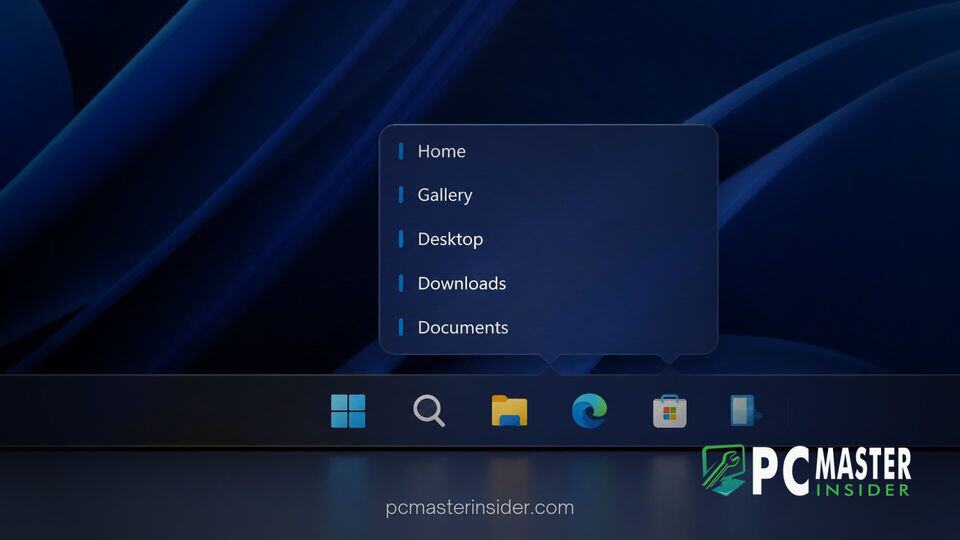
Microsoft is experimenting with a new setting in Windows 11 preview builds that allows users to swap visual taskbar thumbnail pop-ups for a text-only list view. The unreleased feature provides a cleaner interface for power users who manage numerous open application windows simultaneously.
By default, hovering over an icon on the Windows 11 taskbar displays a small graphical thumbnail image of each active window. The experimental toggle introduces a dedicated drop-down menu in Settings that lets users explicitly choose between classic thumbnail previews and a compact text list view.
Experimental Taskbar Preview Option in Build 26340.9577
The feature was first discovered in Windows 11 Insider Experimental Preview Build 26340.9577 for version 26H2. Independent Windows researcher PhantomOfEarth spotted the addition hidden behind a feature flag within the update. Known internally as TaskbarEUIListView, the option adds a dropdown setting under Settings > Personalization > Taskbar > Taskbar behaviors labeled "Show taskbar previews as".
When enabled, the setting offers two choices: Thumbnail, which remains the default mode, and List. Selecting List replaces the image flyouts with a simple vertically stacked list of open window titles.
Differences Between Thumbnail Previews and Text List View
For years, Windows has generated live thumbnail previews when hovering over taskbar buttons. While visually appealing, thumbnail cards take up significant screen real estate when several documents or browser tabs are open at once. Historically, Windows would automatically fall back to a text list view only if a user opened more than 16 or 20 instances of a single application.
The new experimental setting gives users manual control over this behavior regardless of how many windows are open. Text list views are significantly faster to scan when dealing with multiple file directories, email messages, or text documents, as users can read window titles without waiting for graphical thumbnails to render or struggling with tiny preview images.
This test comes alongside other recent taskbar interface adjustments across Windows 11 build updates. Microsoft has faced persistent user feedback requesting the return of classic desktop workflow choices that were simplified or removed during the original launch of Windows 11. Prior to recent updates, power users relied on registry tweaks like NumThumbnails to force list views, but those registry overrides ceased functioning in recent updates, prompting calls for an official toggle.
How to Enable the windows 11 taskbar preview list view Feature
Because Microsoft has not officially announced or enabled the feature by default for all Insiders, the text list toggle is currently hidden. Windows Insiders running Build 26340.9577 or higher in the Experimental channel can manually activate the feature flag using third-party configuration utilities like ViVeTool.
To enable the setting manually, users execute the command vivetool.exe /enable /id:62932453 in an elevated Command Prompt or Terminal window and restart their system. Once activated, the option becomes accessible within the standard Taskbar behaviors section of the Windows Settings app.
Microsoft frequently tests hidden capabilities in Insider flights, including recent tests for a scrollable Phone Companion pane in the Start menu and Quick Settings Energy Recommendations. While hidden flags show active development, they do not guarantee immediate inclusion in general availability releases.
Expected Rollout Timeline for Windows 11 Users
Since the text-only taskbar preview setting is currently in A/B testing within the Experimental channel, Microsoft has not shared a specific public rollout date. If feedback from early testers proves positive, the option could eventually reach public Beta and Release Preview channels.
Industry observers anticipate that if approved, the feature will likely arrive in a future feature update or momentum package for Windows 11. For now, desktop power users seeking a less cluttered taskbar experience will need to rely on Insider preview flights or wait for Microsoft to push the toggle to broader preview rings.



