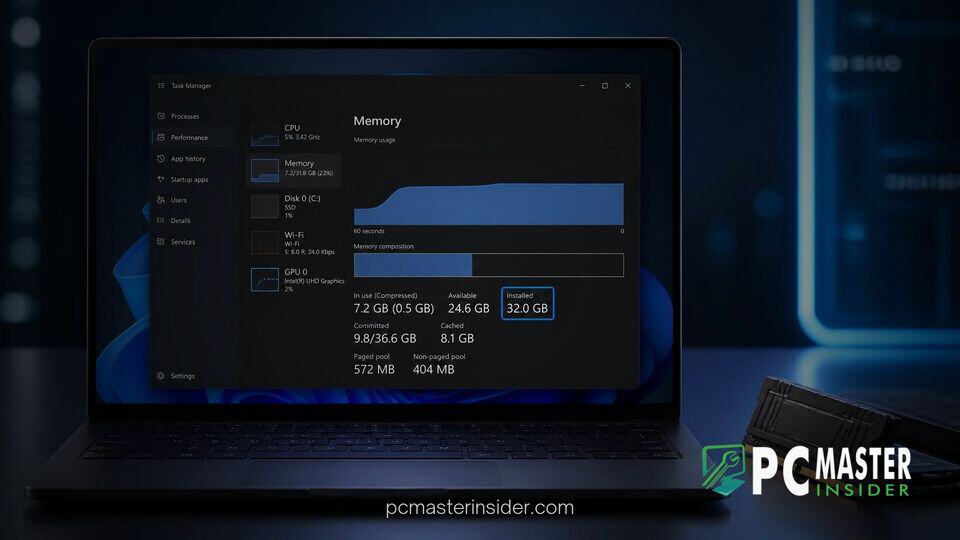
Microsoft is making a subtle yet important change to how hardware resources are reported inside Windows 11. By refining the underlying telemetry and interface elements in the Task Manager, the operating system now provides a clearer accounting of total physical installed memory alongside the portion accessible to software applications.
This adjustment directly resolves a long-standing point of end-user confusion regarding missing system RAM. For years, users inspecting system diagnostics frequently noticed discrepancy numbers when comparing physical hardware modules against usable operating system memory. The updated layout ensures that total physical memory remains visible regardless of firmware reservations or integrated GPU allocations.
Windows 11 Task Manager Total Memory Accounting and System Telemetry Updates
Under the revised accounting model, Task Manager clarifies the distinction between total installed physical RAM and total operating system usable memory. Rather than presenting a single total figure that omits memory reserved by hardware components, the interface breaks down physical capacity, reserved hardware memory, and available software pools into intuitive metrics.
This update ensures that systems equipped with integrated graphics, hardware virtual machines, or specialized motherboard chipsets present a transparent view of memory allocation. For instance, when an APU reserves several gigabytes of system memory for frame buffering, Task Manager clearly attributes that memory rather than simply hiding it from the total capacity metric.
Task Manager Updated to Account for Total Physical Memory
In previous iterations of Windows 10 and earlier Windows 11 releases, Task Manager primarily reported physical memory after subtracting hardware-reserved blocks. If a desktop featured 16 GB of physical RAM but reserved 2 GB for integrated graphics or system firmware, the top-level metric would often present the total as 14 GB. This behavior frequently led users to suspect memory module failures or motherboard configuration errors.
With the latest system revisions, Microsoft aligns Task Manager more closely with the information found in the Settings app and System Information tools. The top header on the Memory performance panel prominently lists the full physical hardware capacity. Meanwhile, hardware-reserved allocations remain explicitly listed at the bottom of the interface, allowing users to verify that all physical memory sticks are recognized and operating correctly.
Understanding the Breakdown Changes on the Performance Tab
The revised Performance tab reorganizes how secondary memory statistics are categorized. When users open Task Manager via the traditional shortcut (Ctrl + Shift + Esc) and navigate to the Memory section, they are presented with a structured breakdown:
- Installed Memory: The total capacity of physical DRAM sticks installed on the motherboard.
- In Use: Physical memory currently actively occupied by applications, background processes, and kernel drivers.
- Available: Memory currently free or held in standby caches ready for instant allocation.
- Hardware Reserved: Memory allocated by BIOS/UEFI firmware for onboard components, such as integrated graphics processing units.
- Committed: The total virtual memory allocated across physical RAM and the system pagefile.
This organized structure eliminates ambiguity, making it easier to determine whether high RAM usage stems from application demands or hardware-level reservations.
How the New Memory Accounting Helps Track System Resource Usage
Accurate resource accounting is critical for administrators, gamers, and software developers who rely on precise telemetry to diagnose performance bottlenecks. When troubleshooting high memory usage, confusing readouts often lead users toward unnecessary hardware upgrades or troubleshooting steps.
By exposing exact memory distribution figures, users can immediately verify if a freshly installed memory module is recognized by the system. Furthermore, it helps gamers identify if integrated graphics settings are eating into available system RAM. System monitoring continues to evolve alongside security features like automatic Memory Integrity in Windows 11, which also relies on low-level virtualization and kernel memory protection.
Similarly, understanding raw hardware limits is crucial for users managing memory-intensive workloads or tracking enterprise infrastructure issues, such as recent bugs causing SQL Server connection leaking during database operations.
Availability and Rollout Status in Windows 11 Preview Builds
The updated memory accounting logic is rolling out across preview channels for Windows Insider testers before its general availability in cumulative update packages. Microsoft routinely tests utility enhancements within Insider builds, mirroring recent interface refinements like the deployment of the modernized WinUI 3 Run dialog and revamped platform features like inline actions in Windows Search.
Users participating in the Beta and Dev channels can inspect the revised memory panel in Task Manager today. Assuming positive feedback from community testing, the refined memory reporting system is expected to hit general availability in an upcoming Windows 11 feature update.
In summary, Microsoft's update to Task Manager memory tracking represents a welcome refinement for system clarity. By presenting complete physical capacity while clearly detailing hardware-reserved blocks, Windows 11 offers users a transparent, accurate view of their system's memory architecture.