
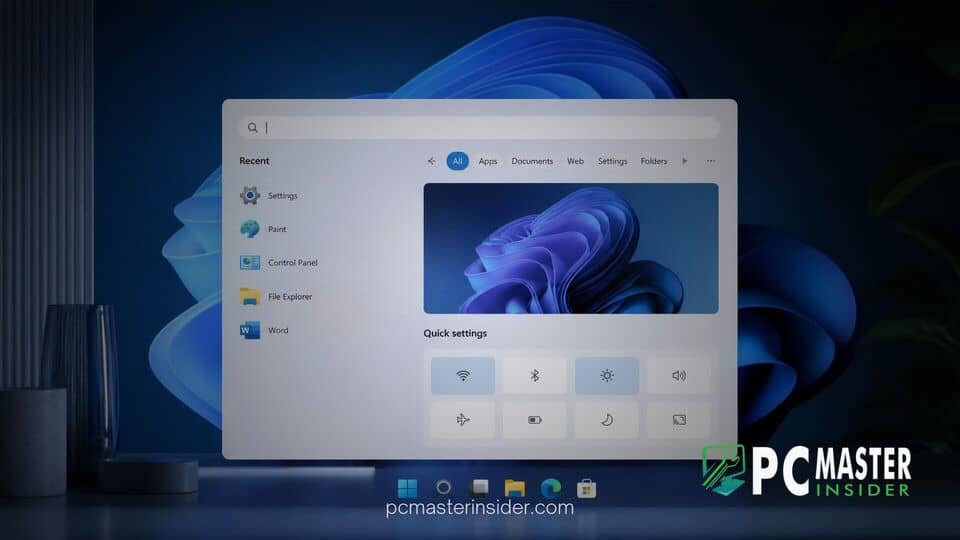
Microsoft has officially unveiled a completely redesigned Windows 11 Search experience that turns the taskbar query box into an interactive control center. Built from the ground up on the modern WinUI 3 platform, the new utility enables users to execute everyday system tasks without opening the dedicated Settings application.
The update, unveiled during Microsoft's fall hardware and software showcase by Windows lead Pavan Davuluri, aims to eliminate unnecessary menu navigation. By replacing traditional static search lists with actionable inline controls, users can adjust hardware toggles, reconfigure window layouts, and manage notifications in seconds.
windows 11 search redesign quick actions
The core focus of the new Windows 11 search redesign quick actions is turning natural language phrases into immediate functional commands. Instead of acting purely as a file launcher or web query field, the taskbar search box interprets typed requests and presents interactive sliders or execution buttons right within the pop-up panel. This design overhaul focuses heavily on keyboard productivity, allowing users to modify system parameters without ever touching their mouse.
In addition to system adjustments, Microsoft is taking steps to clean up clutter from the default desktop experience. Following user feedback regarding aggressive web promotions, the updated taskbar interface suppresses unsolicited web search suggestions and Bing advertisements unless the user explicitly requests them. This initiative complements previous work like when Microsoft paused the Ask Copilot taskbar search bar to re-evaluate user feedback regarding search clutter.
Overview of the WinUI 3 Windows Search Redesign
Underneath the visual modifications sits a complete underlying architectural rebuild. Microsoft has migrated the Windows Search infrastructure to WinUI 3, bringing it in line with ongoing desktop modernizations seen across the operating system. Developers and power users will recognize this underlying framework, which was similarly highlighted when the Tiny11 developer teased a ground-up redesign for Windows 11 26H2 to optimize system overhead.
The transition to WinUI 3 delivers significant efficiency gains. According to Microsoft, early telemetry indicates substantial reductions in system memory utilization alongside faster launch times. Users will notice that opening search now feels instantaneous, resolving previous complaints where loading web-based previews caused noticeable lag on lower-tier hardware.
Visually, the UI has been simplified into a cohesive single-column layout. Microsoft discarded the legacy dual-pane preview window, which consumed excessive screen real estate, in favor of a clean stream that prioritizes local files, recently accessed apps, and immediate quick actions.
Supported System Commands and Quick Actions
The initial release supports an array of practical everyday shortcuts that users can invoke directly. Supported commands include:
- Display and Theme Controls: Typing commands like "switch to dark mode", "turn on Night Light", or "dim my screen" triggers immediate adjustments without browsing the Display settings page.
- Audio and Connectivity: Users can enter "mute" or "turn on Bluetooth" to manage device radios and sound levels instantly. Microsoft also demonstrated an integrated slider for adjusting microphone volume directly inside the search window.
- Window Management: Commands such as "arrange windows on screen" or "minimize all my windows" help organize cluttered desktop workspaces on the fly.
- Cross-Device Actions: Through Phone Link integration, future revisions will allow users to send SMS text messages or trigger an audible ping to locate a connected smartphone directly from the taskbar.
UI Interface and Performance Improvements
Aside from inline settings toggles, Microsoft has upgraded the core search algorithm to better interpret user intent. The updated engine features enhanced tolerance for typos and broad synonym recognition, helping users land on the correct file or setting even if the exact keyword is misspelled.
These rendering optimizations fit alongside broader platform enhancements aimed at maintaining system smoothness under load. Similar efforts can be seen across the ecosystem, including updates that lower system footprint such as when Windows 11 Version 26H2 update reduced desktop RAM consumption for background services.
Availability and Insider Testing Roadmap
The redesigned Windows Search interface began rolling out to preview testers on October 7, 2026. Currently, it is accessible to Windows Insiders enrolled in the Experimental and Experimental (26H1) channels, spanning builds 26340.9616 and 28120.3181. During this initial testing phase, support is limited to English-language system configurations.
Insider feedback will help Microsoft calibrate command accuracy and evaluate stability across diverse hardware configurations before expanding availability. While Microsoft target deployment for general Windows 11 users later this fall, broader rollouts to the Start menu interface are slated for future OS releases extending into 2027.
By blending system toggles with lightweight WinUI 3 rendering, Microsoft is turning Windows Search back into a dedicated utility tool. This update represents a promising step toward making basic desktop management faster, cleaner, and far more convenient for everyday users.



