
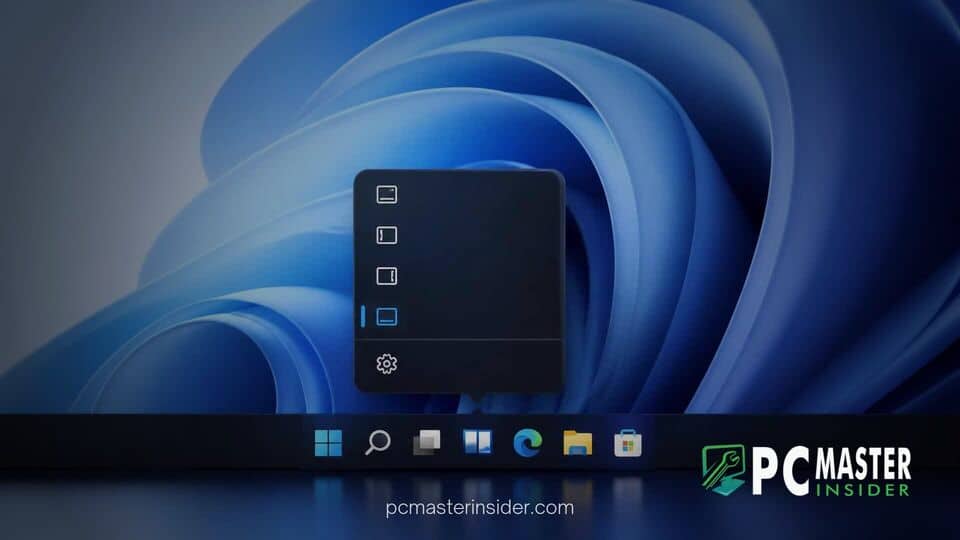
Microsoft is testing a new taskbar customization shortcut in early Windows 11 preview builds, giving users direct context menu controls to change screen positions quickly. The experimental feature allows testers to move the taskbar to the top, left, right, or bottom of the display directly from a right-click interface rather than searching through system settings.
New Right-Click Menu Simplifies Windows 11 Taskbar Alignment
Microsoft is actively testing a right-click menu to move the taskbar in recent Windows 11 preview builds, offering one-click alignment options directly on the desktop. This new feature streamlines display setup by removing the requirement to open the main Settings app whenever users want to alter their desktop layout.
Since the release of Windows 11, taskbar flexibility has been a prominent topic among power users and long-time desktop enthusiasts. While Windows 10 allowed users to unlock and reposition their desktop panel with ease, early releases of Windows 11 locked the interface to the bottom edge. Although Microsoft recently began re-introducing multi-edge placement through deep settings panels, accessing those features requires several navigation steps. The latest preview experiment aims to reduce that friction dramatically.
Dedicated Taskbar Position Controls in Build 26340.9750
The updated context menu interface was spotted within Windows 11 Insider Preview Build 26340.9750 in the Experimental Channel. When users right-click an empty area on the taskbar, the pop-up menu displays traditional entries like Task Manager and Taskbar settings, alongside four new dedicated position buttons: Left, Top, Right, and Bottom.
Clicking any of these buttons instantly moves the panel to the selected screen edge. System elements like Start, Search, and system tray icons automatically adjust their orientation to fit the new alignment. Early testing indicates that switching between edges works smoothly without requiring a system restart or user sign-out. This effort aligns with broader updates across the operating system, such as how Windows 11 preview builds add a customizable File Explorer context menu to minimize unnecessary clicks.
Comparison to Legacy Windows 10 Drag-and-Drop Navigation
In Windows 10 and earlier releases, changing the taskbar location was typically done by unlocking the panel and dragging it across the screen with a mouse cursor. While some users have requested a full return of drag-and-drop movement, Microsoft appears to be favoring a button-driven context menu approach instead.
A menu-driven system offers distinct advantages for modern devices, particularly touchscreens and multi-monitor setups where click-and-drag mechanics often trigger accidental moves. Selecting an explicit edge from a list ensures predictable placement without accidental desktop reorganization. Modern taskbar architectural changes have required rebuilt layouts, which is why Microsoft has taken a phased approach to restoring lost capabilities while keeping the system stable.
How the Repositioning Setting Works in Insider Previews
Currently, the right-click alignment feature is hidden behind internal staging flags within the Windows Insider build and is not turned on by default for all users. System analysts and testers who enabled the hidden menu confirmed that changing positions is responsive even on lower-spec hardware.
Under the hood, the menu acts as a rapid shortcut to the underlying system policies located in the Settings app under Personalization > Taskbar > Taskbar behaviors. When a user selects a location from the right-click menu, the system writes the change directly to the registry and updates the shell in real time.
This design improvement is part of Microsoft's broader focus on context menu refinements. Recent insider updates have introduced cleaner right-click actions across the OS, similar to how Windows 11 preview brings dark mode to File Explorer folder options for visual consistency across desktop dialogs.
Expected Public Rollout and Future Taskbar Enhancements
Because the feature is currently undergoing internal evaluation in the Experimental channel, Microsoft has not officially committed to a firm public release date. Features tested in early preview builds can undergo design revisions or experience delays before reaching standard general availability updates.
If feedback from testers remains positive, the right-click alignment buttons could arrive in a future cumulative update or annual feature release. Microsoft is also continuing work on secondary taskbar features, including improved auto-hide behaviors, smaller icon options, and touch gesture refinements for non-standard screen placements.
These taskbar adjustments coincide with several system-level fixes across the platform. For instance, recent maintenance releases have addressed underlying software bugs, such as when Microsoft fixed a Windows 11 bug causing crashes in AC-3 audio games, alongside ongoing work to polish the user experience.
By bringing position controls directly to the right-click context menu, Microsoft is providing a welcome compromise for users seeking faster desktop customization. While it may not fully replicate the legacy drag-and-drop mechanics of past Windows versions, the convenience of one-click repositioning represents a clear step toward a more flexible desktop environment.



