
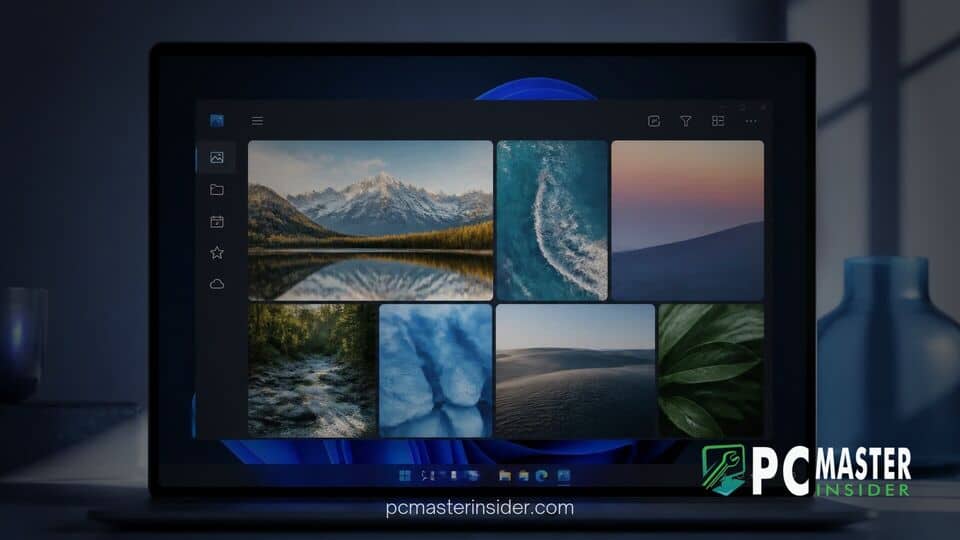
Microsoft has officially announced a comprehensive overhaul of the default Photos app for Windows 11, introducing an updated user interface that consolidates locally stored media alongside cloud libraries from OneDrive and Apple iCloud into a single unified gallery. The update, which is rolling out to Windows Insiders before a planned general release, also delivers native WinUI 3 performance enhancements for both photo viewing and image editing workflows.
The redesign arrives as part of Microsoft's broader effort to modernize core built-in operating system applications. By pairing upgraded cloud integration with faster native tools, the company aims to simplify media management for users who store their personal photograph collections across multiple operating systems, mobile devices, and remote cloud storage platforms.
windows 11 photos app redesign onedrive icloud
The central feature of the latest update is a revamped gallery interface that seamlessly surfaces photographs and video recordings saved on the local PC, Microsoft OneDrive, and Apple iCloud without requiring users to manually navigate separate application windows. Built to eliminate file fragmentation, the gallery allows users to filter, sort, and organize their entire photographic history across multiple cloud services in real time. The unified workspace supports natural language search queries, improved facial recognition filtering, and automated cloud memories, providing a centralized hub for cross-platform media management.
Redesigned Photos App Integrates Local, OneDrive, and iCloud Content
Managing photo libraries across competing ecosystems has historically created friction for Windows desktop users, particularly those who rely on Apple iPhones for mobile photography. To bridge this gap, Microsoft designed the new Photos gallery to pull media directly from connected cloud providers while retaining support for local offline storage. Users running Windows 11 preview builds can now view all their assets in a single continuous timeline view.
Connecting an Apple photo collection to the application requires installing the official Apple iCloud for Windows application and enabling photo synchronization. Once configured, new pictures and videos captured on iOS devices automatically sync to the desktop gallery. Similarly, Android and Windows users can link their mobile device camera rolls through the OneDrive Camera Backup feature. Importantly, Microsoft clarified that signing in to a Microsoft account or OneDrive is not strictly mandatory to browse locally stored images or iCloud content on the PC.
This release reflects a broader push across Microsoft's ecosystem to refine default platform utilities. It follows similar system-level utility improvements, such as ongoing tests where Windows 11 brings dark mode to File Explorer folder options, highlighting a continued focus on native design consistency across desktop workflows.
Unified Gallery and Natural Language Search
To make navigating massive photograph collections easier, Microsoft has implemented a natural language search engine directly inside the Photos app. Rather than searching by strict file creation dates or custom tags, users can type descriptive phrases into the search bar, such as "family picnic by the lake" or "sunset at the beach," to instantly locate matching images.
In addition to descriptive text search, the update introduces a revamped People filter, which groups photos according to the individuals appearing within them. Users can combine multiple search parameters simultaneously, filtering by storage location and specific family members. For users signed into OneDrive, the app introduces a feature called Moments, which automatically groups related photos from past events into themed digital recaps that can be played back as slideshows or exported as video files.
Rebuilt WinUI 3 Photo Editor and Viewer
Beyond the unified gallery interface, Microsoft has completely rebuilt the application's underlying editing and file-viewing architecture using modern WinUI 3 controls. According to official performance benchmarks published by Microsoft, the native image editor now launches approximately 25 percent faster than previous software builds, while the dedicated photo viewer opens standard file formats up to 15 percent faster and heavy HEIC image files up to 30 percent faster.
The rebuilt photo editor categorizes its toolkit into four main workflows: Crop, Enhance, Repair, and Stylize. Key functional additions include:
- AI-Powered Repair: An upgraded object removal tool that allows users to circle or brush over unwanted background distractions to cleanly erase them.
- Relight Controls: An advanced lighting tool that lets editors adjust light direction, intensity, and ambient color across up to three virtual light sources.
- Native Format Editing: Full support for editing and saving modern image formats like HEIC and WebP directly in their native file formats without forcing conversion.
- HDR Color Retention: Enhanced color pipeline management that preserves high dynamic range (HDR) color profiles and contrast data throughout the editing process.
Performance Optimizations and Broader Rollout Plans
Performance remains a key area of focus for Windows desktop applications, especially as Microsoft moves away from legacy codebases. Parallel optimization efforts can be seen in recent operating system updates, such as build changes where a Windows 11 preview accelerates Edge launches by streamlining system background processes. Applying similar efficiency goals to the Photos app ensures heavy multi-gigabyte picture libraries scroll smoothly across desktop hardware configurations.
The architectural shift has generated widespread feedback from the Windows community. While power users and creative enthusiasts have welcomed the speed improvements delivered by the native WinUI 3 photo editor and viewer, some community testers have noted that the main gallery interface utilizes Microsoft's web-based WebView2 framework to render cloud items. Despite this technical split, early testing indicates that browsing speed and media indexing remain responsive across mainstream desktop hardware.
The updated Photos experience is currently undergoing rollout stage testing across the Windows Insider Canary, Dev, and Beta channels. Microsoft confirmed that after gathering feedback and finalizing stability patches, the redesigned experience will begin expanding to all general Windows 11 users via the Microsoft Store in upcoming updates.
By unifying local storage, OneDrive, and Apple iCloud into one central hub alongside responsive editing tools, Microsoft is positioning the updated Photos app as a versatile default solution for managing multi-device media collections on Windows 11.



