
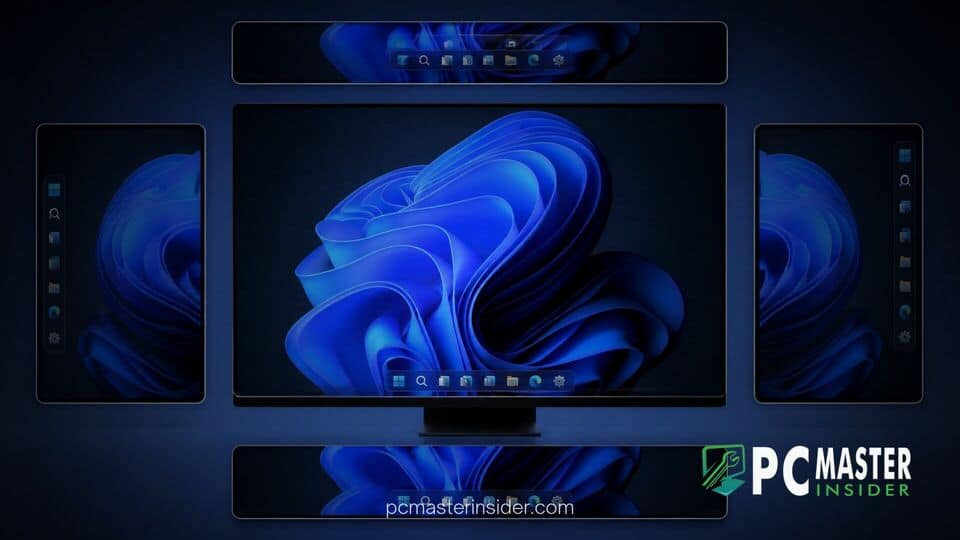
Microsoft has officially released Windows 11 version 26H2, restoring one of the most highly requested customization features since the operating system launched. Users can now move the taskbar away from the bottom of the screen and attach it to the top, left, or right edges of their display.
The restored alignment options arrive alongside new system tray scaling settings, refined flyout behaviors, and updated Start menu adjustments. This update addresses years of user feedback after Microsoft originally locked the interface element to a fixed bottom position in 2021.
Restored Taskbar Personalization in Windows 11 26H2
The latest feature update brings comprehensive control back to desktop customization, allowing power users and enterprise workflows to adapt screen space to multi-monitor or vertical monitor setups. Under the official update, Microsoft has restored native positioning controls directly inside the Settings application under the Taskbar behaviors section.
Alongside flexible positioning, the release improves window management when utilizing vertical layouts. Users who prefer vertical orientation can view uncombined window buttons with full text labels, making switching between multiple active applications faster on widescreen displays.
Top, Left, and Right Screen Alignment
When changing the taskbar position to the top, left, or right edge of the screen, the entire shell interface adapts dynamically. System flyouts, including the Start menu, Quick Settings, and Windows Search, automatically anchor to match the designated edge. For example, placing the bar at the top causes the Start menu to open downward naturally.
Icon alignment options remain flexible across all four screen edges. Users can choose to center their app icons or keep them aligned toward the primary corner, maintaining consistency regardless of whether the bar sits horizontally or vertically.
Compact Layout and Icon Sizing Controls
In addition to edge positioning, Microsoft has introduced a dedicated compact taskbar layout in Windows 11 version 26H2. This setting reduces both icon size and total taskbar height, freeing up valuable vertical real estate on laptops and smaller displays.
The updated layout controls complement recent system tweaks, such as experimental text-only taskbar preview lists and improved notification center management, offering a cleaner interface for minimalist desktop setups.
Rollout and System Configuration Requirements
The restored placement features are rolling out as part of the broader Windows 11 26H2 update package. Eligible devices running recent releases like version 24H2 or 25H2 can install the update via a quick enablement package, requiring minimal downtime during restart.
Users can access the new layout options by navigating to Settings > Personalization > Taskbar and expanding the Taskbar behaviors menu. From there, a simple drop-down selector allows users to instantly shift the bar across all connected displays without requiring registry edits or system restarts.
By reinstating side and top edge alignment options alongside modernized sizing controls, Microsoft has resolved a long-standing point of friction for desktop enthusiasts. The return of flexible taskbar placement in Windows 11 26H2 provides users with the visual freedom they have requested since the operating system debuted.



