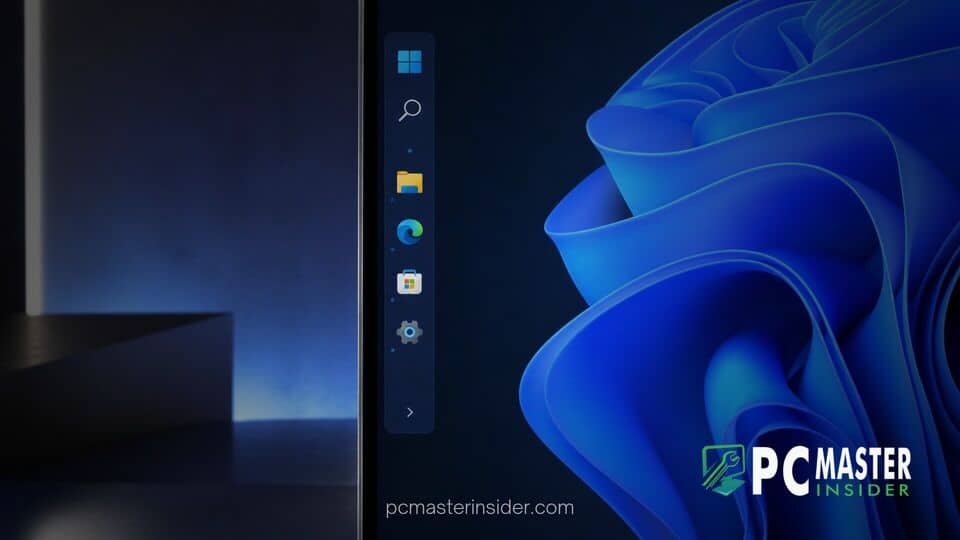
Microsoft has confirmed that it is actively developing auto-hide support for vertical and top taskbar configurations in Windows 11. The upcoming functionality will allow users to dock their taskbar to the left, right, or top edge of the screen while retaining full auto-hide capabilities.
The confirmation addresses a notable limitation in the modern Windows desktop shell, where auto-hiding was strictly restricted to the traditional bottom taskbar position. As Microsoft continues refining desktop customization tools, restoring parity with classic taskbar functionality has emerged as a top priority for power users and ultrawide monitor owners.
Auto-Hide Support Planned for Moved Windows 11 Taskbars
The confirmation came directly from Tali Roth, Head of Product on Microsoft's Windows Shell team, who noted that engineering work is currently underway to bring auto-hide support to alternate dock positions. For desktop customizers seeking a windows 11 auto hide vertical taskbar experience, this update resolves one of the biggest friction points remaining in the redesigned operating system architecture.
Under the planned update, moving the taskbar to the left or right side of the display will no longer force it to remain permanently visible on screen. Instead, users will be able to toggle automatic hiding in system settings, allowing the panel to collapse out of sight until the mouse cursor triggers the screen edge.
In addition to hiding the core taskbar strip, Microsoft is aligning related shell overlays to ensure consistent placement across non-standard layouts. Engineers are working to make system components like the Notification Center, Quick Settings, and flyout controls intelligently respond to side-docked and top-docked configurations.
Feedback from Desktop Customization Users
User demand for flexible taskbar controls has remained strong since the launch of Windows 11, which initially restricted the bar to a static bottom layout. While third-party utilities previously filled the void, official shell updates have slowly reintroduced native alignment options, leaving auto-hide support as the main missing piece.
Community feedback highlighted that forced visibility on vertical taskbars proved problematic on widescreen displays, where lateral screen real estate is at a premium. Content creators, software developers, and multi-monitor users frequently noted that an persistent side bar created unwanted visual clutter and reduced canvas space in professional applications.
Microsoft's product team acknowledged these concerns, prioritizing shell flexibility after earlier treating alternative alignments as low-priority legacy options. The shift reflects a broader initiative within the Windows Shell engineering group to give users greater control over their workspace ergonomics without relying on external software tweaks.
Current Windows 11 Taskbar Docking Limitations
While recent updates introduced taskbar resizing and basic position options, secondary interfaces have suffered from alignment glitches when moved away from the bottom of the screen. For example, Microsoft confirmed a Windows 11 WinUI search bug on moved taskbars where the pop-up search interface misaligned or detached from the bar's physical location.
These shell inconsistencies extend to standard desktop interactions, making the current side-docking implementation feel incomplete for daily workflows. Beyond search positioning, Microsoft has also focused heavily on system-level efficiency across the board, such as core app optimizations saving 900MB RAM in Windows 11 to keep background tasks lightweight while rendering complex shell animations.
By resolving auto-hide behavior alongside search alignment, Microsoft aims to deliver a cohesive experience regardless of screen orientation. Power users who utilize vertical monitors or portrait setups will finally gain full parity with traditional desktop layouts.
Expected Timeline and Insider Channel Availability
Microsoft has not provided an exact public release date for the vertical auto-hide capability, though preliminary testing is expected to surface in early Windows Insider Preview builds. Desktop shell features of this nature typically undergo evaluation in the Dev and Canary channels before rolling out to general release builds.
The company is taking a staged approach to taskbar updates, ensuring that shell stability remains intact across various display scalings and multi-monitor environments. Related stability initiatives in recent OS revisions, such as moving Windows 11 Wi-Fi drivers out of the kernel, highlight Microsoft's focus on insulating core UI components from unexpected system crashes.
As preview builds progress, Windows Insiders can expect to test the expanded auto-hide toggles directly within the Personalization section of the Windows 11 Settings app. Once fully validated, the feature will arrive in a future non-security preview update or annual feature release.
The arrival of native auto-hide support for vertical taskbars marks a welcome step forward in restoring desktop customization choices. By addressing long-standing user feedback, Microsoft is ensuring Windows 11 adapts to diverse desktop setups while maintaining a clean, modern aesthetic.