
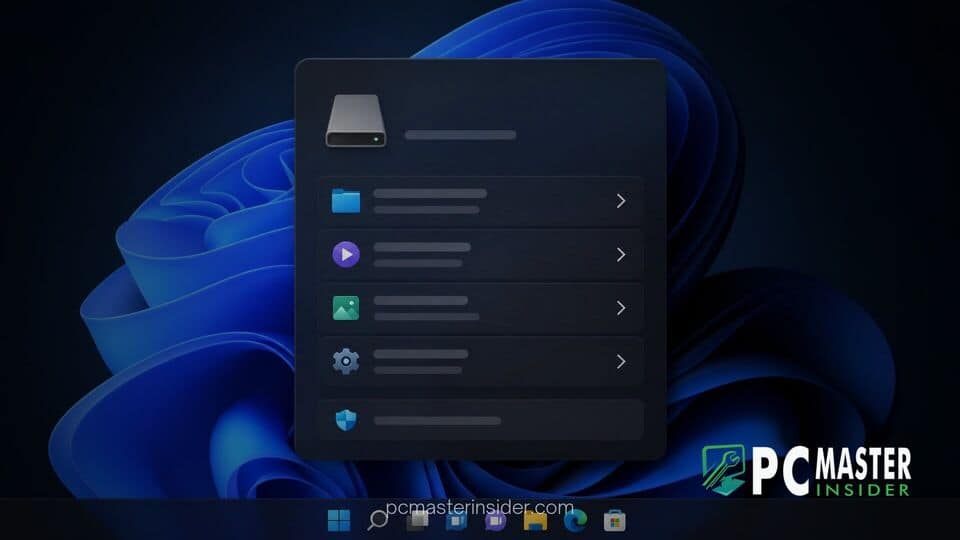
Microsoft is rolling out a modern WinUI makeover for one of its oldest remaining user interface components in Windows 11, replacing the decades-old AutoPlay dialog box with a sleek, modern visual aesthetic. The updated interface incorporates native dark mode support, Fluent Design elements, rounded corners, and enhanced display scaling responsiveness while retaining core media handling features.
Windows 11 WinUI AutoPlay dialog redesign
The Windows 11 WinUI AutoPlay dialog redesign replaces the outdated Win32 prompt that appears whenever users plug in removable media such as USB flash drives, memory cards, or smartphones. Built using the modern WinUI 3 framework, the updated prompt introduces a dark theme that matches system preferences, centered layout positioning, enhanced touch targets, and persistent integration with the Windows 11 Notification Center.
Modern WinUI AutoPlay Experience Arrives in Windows 11
For years, connecting an external drive or smartphone to a Windows PC triggered a pop-up prompt whose aesthetic roots could be traced back through several iterations of the desktop operating system. While Windows 11 introduced modern design principles across the Start menu, Settings app, and Taskbar, legacy dialog boxes frequently reminded users of code structures left unchanged since earlier software eras.
The revised AutoPlay prompt updates this functional popup using modern development tools. When external storage hardware is inserted, the operating system renders a clean dialog box with Fluent typography and smooth opening animations. The interface adheres to system-wide accent colors and offers elevated visual harmony alongside contemporary Windows desktop application windows.
Key Features of the Redesigned AutoPlay Dialog
The visual transformation brings several concrete updates intended to streamline user interactions:
- Native Dark Mode Support: The prompt dynamically shifts between light and dark themes based on system settings, resolving a long-standing complaint from night-owl users.
- Centered Display Positioning: Moving away from the top-right flyout style used in Windows 8, the dialog defaults to a centered layout reminiscing classic desktop releases.
- Granular Selection Controls: Users can choose action behavior with dedicated options to execute a selected default app action just once or set it to always apply for that medium.
- Fluent Design Elements: Softened rounded edges, updated iconography, and consistent padding make the prompt feel integrated into modern shell interfaces.
Notification Center Integration and Display Scaling
Beyond cosmetic adjustments, the WinUI framework infrastructure delivers practical usability improvements. AutoPlay notifications now dock cleanly within the Windows 11 Notification Center. If a prompt is dismissed or missed while working in another application, users can review pending media actions at a later time without needing to physically unplug and reinsert their hardware.
Furthermore, legacy Win32 dialogs frequently struggled with high-DPI monitors, often rendering microscopic text or blurred graphics when connected to modern high-resolution displays or specialized display scaling setups. Rebuilding the dialog with WinUI resolves these display artifacts, ensuring that icons, text labels, and click target areas scale dynamically across high-DPI monitors, laptops, and touchscreen devices.
Microsoft's Ongoing Modernization of Legacy Windows Shell Components
This update represents part of a broader engineering effort inside Microsoft to systematically phase out outdated Win32 elements throughout the Windows shell. Despite major graphical iterations in recent years, Windows 11 contained dozens of legacy applets, properties pages, and dialog boxes inherited from legacy code bases.
As part of internal quality initiatives, engineering teams have gradually converted individual shell components to WinUI 3. Recent preview builds have introduced modernized versions of File Explorer Properties sheets, print dialogs, and updated system dialog controls. By replacing legacy elements component by component, Microsoft maintains retro-compatibility for deep enterprise management features while refining daily visual points of interaction.
Availability Across Insider Channels and Rollout Timeline
The redesigned AutoPlay interface is currently rolling out to early testers enrolled in Windows Insider Preview channels. Microsoft is conducting phased feature deployment, gathering feedback regarding window layout proportions, touch targets, and functional stability across diverse desktop environments.
While experimental build participants can test the modern prompt immediately, general consumers on stable builds of Windows 11 can expect the updated interface to arrive in upcoming feature update rollouts once preview validation wraps up.
The modern AutoPlay overhaul demonstrates Microsoft's intent to eliminate visual inconsistencies across the operating system. By bringing WinUI and dark mode to long-neglected prompts, Windows 11 achieves a more cohesive desktop environment for users.



