
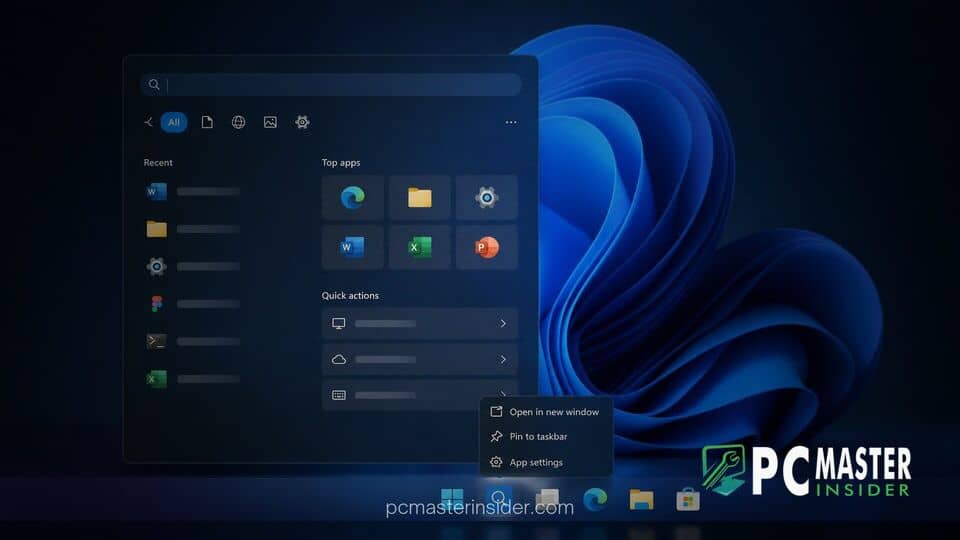
Microsoft has officially unveiled a completely overhauled Search experience for Windows 11, moving away from legacy web-wrapper components toward a native codebase built on WinUI 3. The updated architecture enables users to trigger native system controls directly from the search box using simple typed commands.
The announcement was detailed during Microsoft's recent hardware and software showcase, where Windows head Pavan Davuluri demonstrated how the redesigned taskbar search acts as an interactive control hub. By modernizing the underlying framework, the development team aims to resolve long-standing complaints regarding interface latency, memory overhead, and inconsistent result ranking.
WinUI 3 Overhaul Brings Faster Search and Direct Taskbar Actions
The updated feature set centers on a fundamental shift in how the operating system processes search inputs. Rather than serving solely as a tool for locating local files or browsing web queries, the search bar now functions as an agentic system interface capable of modifying settings immediately. Users can execute common OS-level tasks by typing conversational prompts straight into the taskbar.
Under the hood, the migration to WinUI 3 replaces heavy web components with native, hardware-accelerated controls. This structural change mirrors recent engineering efforts across the operating system, though modernizing shell features has occasionally led to trade-offs, such as when Windows 11 WinUI modernization omitted classic scrollbar shortcuts that existed in earlier releases.
How Inline Typed Commands Work in Windows 11
Inline taskbar actions eliminate the need to navigate through multi-layered menus or open separate system applications. When a user enters a command, the search menu responds with an interactive control toggle or instant execution confirmation right within the results list.
Supported inline commands in the initial release include:
- System Toggles: "Switch to dark mode," "Turn on Night light," and "Turn on Bluetooth".
- Quick Adjustments: "Dim my screen" or "Mute".
- Workspace Management: "Minimize all my windows" or arrange active app windows on screen.
Microsoft noted that future iterations will expand these capabilities to connected smartphone functions via Phone Link, enabling users to send text messages directly from the search bar. Additionally, richer document previews and web cards are scheduled for inclusion in upcoming platform drops.
Performance Gains and Reduced Memory Footprint in Early Testing
Beyond new utility controls, the primary objective of rebuilding search on WinUI 3 is system efficiency. Previous iterations of Windows Search relied heavily on web-connected frameworks, which frequently drew criticism for high background memory consumption and sluggish startup times.
According to official technical details, internal testing shows substantial reductions in RAM footprint and significantly faster query response times. These resource savings align with broader operating system optimizations observed in recent preview builds, similar to how the Windows 11 26H2 enablement package lowers idle system RAM usage across qualified desktop hardware.
To complement the performance overhaul, the user interface drops the traditional two-pane layout in favor of a clean, single-column list. Internal usage telemetry revealed that the vast majority of user clicks occurred on the left-hand list anyway, making the large preview pane redundant for routine app and file launches. The core ranking engine has also been tuned to prioritize local installed applications and files over distracting web search suggestions.
Rollout Timeline and How Insiders Can Test the New Search Box
The rebuilt search experience began rolling out to early testers on October 7, 2026, as part of the Windows Insider Program's Experimental Channel. Microsoft is deploying the feature behind specific update branches, including preview builds similar to those documented in Windows 11 Insider Preview Build 26340.9596.
Insiders who meet the build requirements can manually turn on the feature by navigating to Settings > Windows Update > Windows Insider Program > Feature flags. Because the current pass focuses on core architecture and local commands, English is the primary language supported in the initial experimental build, with full localized support rolling out gradually.
As Microsoft collects feedback from early testing, general availability for standard Windows 11 devices is targeted for a broader release later this fall. The update represents a key step in Microsoft's strategy to streamline desktop navigation, delivering a fast, responsive taskbar search that reduces unnecessary context switching during daily workflows.



