
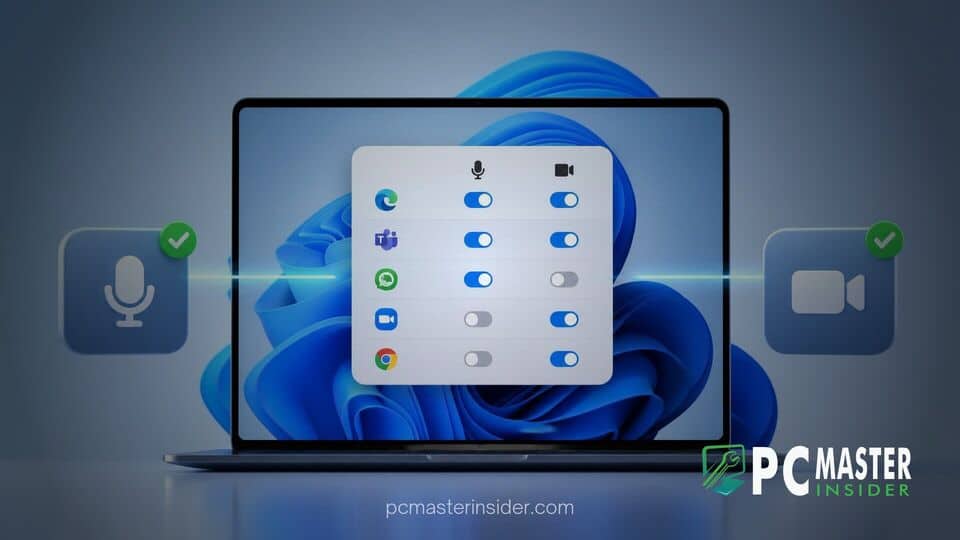
Microsoft has begun testing enhanced privacy controls in an experimental preview build of Windows 11, giving users detailed management over hardware access. The latest update introduces individual toggles to grant or block camera and microphone access for legacy Win32 desktop applications.
Discovered inside Windows Insider Preview Build 26340.9212, this change closes a long-standing privacy gap between packaged Microsoft Store applications and traditional desktop software. By extending permission controls down to individual Win32 programs, Windows 11 aligns its privacy framework more closely with modern mobile operating systems.
New Per-App Privacy Controls in Windows 11
The feature was first uncovered by community sleuths in Windows 11 Experimental Build 26340.9212. Until now, privacy settings in Windows 11 presented a sharp contrast between packaged UWP or Microsoft Store apps and classic desktop applications. While users could easily manage permissions for Store apps on a case-by-case basis, traditional Win32 programs were managed through a single global toggle. Turning off microphone or camera access for desktop apps applied to all classic programs simultaneously, forcing users into an all-or-nothing choice.
With the new experimental build, Windows 11 removes the shared global switch for desktop applications. Instead, installed Win32 software appears as individual entries within the central Privacy and Security settings menu. Users can now manually allow or revoke access for specific desktop tools without affecting other software running on the PC.
Granular Microphone and Camera Management
The new granular controls allow users to tailor hardware access according to specific workflow requirements and security needs. Under the updated Settings interface, popular desktop browsers, communication tools, and media players receive dedicated toggle switches for both the microphone and the webcam.
For instance, a user can maintain active microphone permissions for collaboration tools such as Microsoft Teams, Zoom, or Discord while revoking microphone access for web browsers like Google Chrome or Brave. Similarly, video conferencing software can retain access to the webcam while standalone media players or video editors remain restricted. If a desktop program attempts to access a hardware resource without permission, the system blocks the request at the OS level, giving users direct authority over their hardware.
Location Settings and Permission Prompts
In addition to microphone and camera management, the test build extends granular per-app permissions to location services. Users who prefer to keep system-wide location services disabled can now grant location access exclusively to specific desktop programs, such as mapping software, weather utilities, or browser-based navigation tools, without revealing their position to every installed program.
Complementing these settings is a new interactive permission prompt model. When an unapproved Win32 application attempts to access the camera, microphone, or location data for the first time, Windows 11 generates a system pop-up window asking the user for explicit authorization. This smartphone-style authorization dialog ensures that background processes cannot tap into sensitive input devices without the user's knowledge. All granted or denied permissions are recorded in the central Privacy and Security dashboard, where preferences can be reviewed and modified at any time.
Rollout Timeline and Insider Availability
The addition of per-app privacy controls comes at a time when Microsoft is refocusing attention on fundamental Windows 11 platform features. Security analysts and privacy advocates have long requested unified permission handling, noting that desktop applications represent a significant portion of daily software usage on Windows machines.
From a technical standpoint, implementing hardware restrictions on classic Win32 software has historically been challenging due to how legacy Windows APIs handle hardware access. By building an abstraction layer or system-level gatekeeper that intercepts hardware requests, Microsoft aims to deliver a consistent security baseline across both legacy software and modern applications.
Because these per-app privacy toggles currently reside in an Experimental Insider build, Microsoft has not announced an official consumer release date. Features introduced in experimental preview channels undergo extensive testing to evaluate stability, app compatibility, and system performance before moving to public preview channels.
If testing proceeds smoothly and community feedback remains positive, the updated privacy controls are expected to transition to the Beta and Release Preview channels in the coming months. A broader public rollout could follow in a future major feature update for Windows 11, providing millions of everyday desktop users with heightened control over their device hardware and digital privacy.
Overall, the implementation of per-app hardware controls represents a meaningful upgrade for Windows 11 security management. By bridging the gap between Store apps and classic desktop applications, Microsoft provides users with the precise, mobile-style privacy oversight required in modern computing environments.



