
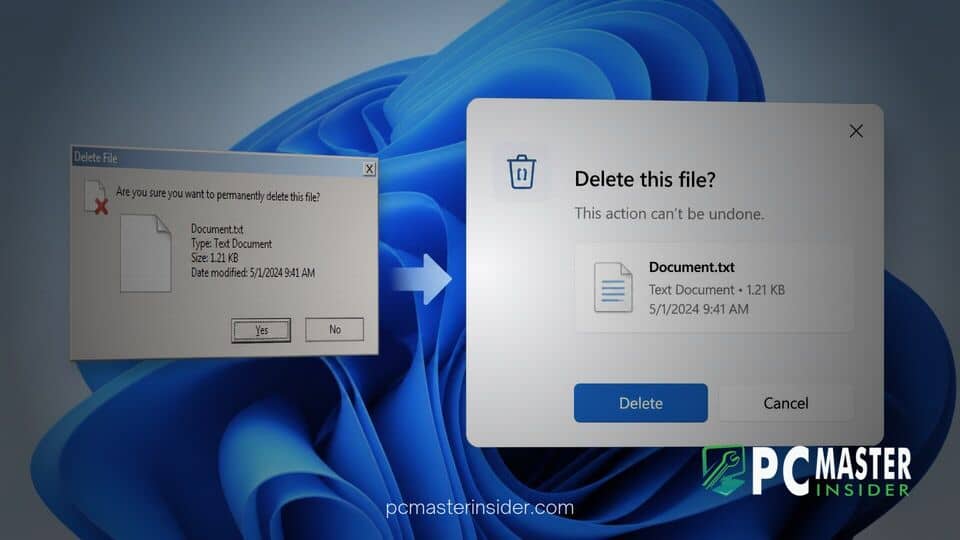
Microsoft is continuing to replace older interface elements in Windows 11, with more legacy dialogs being refreshed to match the operating system’s modern visual language.
The latest changes point to a broader effort to move classic pop-ups and Properties windows toward WinUI 3 and Fluent-inspired design patterns.
Windows 11 Legacy Dialogs Get a WinUI 3 Redesign
Microsoft is gradually replacing long-standing Windows dialogs that still look closer to Windows 10, or even older versions of Windows, than the current Windows 11 interface. The effort aims to make these windows more visually consistent with newer parts of the operating system through updated spacing, typography, rounded elements, and controls that better align with WinUI 3 conventions.
Microsoft has not presented the work as a single major redesign. Instead, the company is introducing updated interfaces incrementally through Windows Insider and preview releases. That approach follows Microsoft’s broader Windows 11 development strategy, where visual and functional improvements frequently arrive in stages.
Microsoft Modernizes Autoplay and File Properties
One of the clearest indications of the next phase of this work came through Microsoft’s recent communication about Windows quality and development. The company said it had strengthened the foundations of WinUI 3 and was extending the framework into more parts of the Windows shell.
Microsoft specifically indicated that redesigned Autoplay and additional file and folder Properties dialogs would be coming to Windows Insider Preview Experimental builds. The announcement and related discussion can be found in this Windows 11 community post covering Microsoft’s Windows quality update.
Autoplay and Properties windows are among the more visible remaining examples of legacy Windows UI. They remain functional and familiar, but their appearance can stand apart from the newer design language Microsoft introduced with Windows 11. Updating these interfaces with WinUI 3 should help reduce some of those visual inconsistencies.
Microsoft has already laid the groundwork for this transition elsewhere in Windows. The company previously highlighted the adoption of WinUI 3 across Windows experiences and applications, including File Explorer and Photos. More details about Microsoft’s broader WinUI strategy are available in Microsoft’s Windows Developer Blog.
That broader context suggests the latest dialog refreshes are part of an ongoing Windows modernization effort rather than isolated cosmetic changes.
WinUI 3 Brings a More Consistent Windows 11 Design
WinUI 3 is important not only because of its appearance but also because of its role in Microsoft’s modern Windows application strategy. Modern dialogs can provide more consistent behavior across Windows features while supporting current design patterns, keyboard interaction, accessibility, and other system conventions.
Microsoft’s WinUI documentation for dialogs outlines how developers can build dialog experiences using modern Windows controls and design patterns.
For Windows users, expanding these technologies across system interfaces could result in better visual consistency between light and dark modes, improved scaling on high-resolution displays, and a more unified experience when moving between different areas of the operating system.
Microsoft Is Updating Legacy Interfaces One by One
The dialog redesign is part of a wider effort to modernize older areas of Windows rather than simply changing their appearance. Microsoft has also been rebuilding and refining other Windows experiences with an emphasis on responsiveness and cleaner interfaces.
In April 2026, for example, Microsoft detailed changes to the Windows Insider experience, including a redesigned Windows Insider Program settings page intended to improve loading performance and simplify the interface. The company explained the changes in its Windows Insider Program update.
Microsoft has also been making targeted visual changes to individual dialogs. In an August 2025 Windows 11 Dev Channel build, the company said it had updated additional dialogs to better match Windows 11 visuals, including the prompt displayed when an app cannot open. Details of those changes are available in Microsoft’s Windows 11 Insider Preview build announcement.
Together, these updates show a consistent pattern: Microsoft is replacing or redesigning older Windows interface elements individually instead of attempting to overhaul every legacy component at once.
New Dialogs Are Still Being Tested in Windows 11 Preview Builds
At this stage, several of the redesigned dialogs remain tied to preview testing rather than broad public availability. Microsoft’s recent communication specifically pointed to Windows Insider Preview Experimental builds for the updated Autoplay experience and additional file and folder Properties dialogs.
As a result, users running stable retail versions of Windows 11 should not expect all of the redesigned interfaces to appear immediately.
Microsoft has also reorganized parts of the Windows Insider Program in 2026 to accommodate earlier-stage experimentation. The company introduced an Experimental channel that can include Future Platforms development not necessarily aligned with an immediate retail Windows release. Microsoft’s explanation of the updated Insider structure provides additional details about how these experimental Windows features are being tested.
This structure gives Microsoft more room to test shell changes, including redesigned dialogs, without committing them to a specific Windows 11 release date.
More Classic Windows Interfaces Could Be Next
The Properties and Autoplay changes are unlikely to be the end of Microsoft’s interface modernization efforts. Other long-standing Windows components have also appeared in redesigned or experimental forms.
Earlier Windows preview testing, for example, highlighted work on an updated Run dialog. A discussion surrounding an Experimental Preview build showed the refreshed experience being tested as an optional feature, further suggesting that Microsoft is examining several remaining legacy parts of the Windows interface. The changes are discussed in this Windows 11 Experimental Preview community post.
Interface consistency has been a recurring criticism of Windows 11 since its launch, particularly because modern Settings pages and applications continue to coexist with older Control Panel and Win32-era interfaces. Updating frequently used dialogs could gradually make those transitions less noticeable.
What to Expect Before General Availability
The next steps will likely depend on Windows Insider feedback and how successfully Microsoft can expand the redesign without introducing compatibility or accessibility problems. Not every interface experiment tested through the Insider Program reaches stable Windows releases immediately, and some features can change significantly before general availability.
However, Microsoft’s broader direction is becoming increasingly clear. The company has spent several years reducing the visual gap between newer Windows experiences and older shell components.
Previous Windows 11 releases have already introduced significant File Explorer and shell improvements as part of that process. Microsoft documented some of those earlier changes in its Windows 11 Insider Preview build notes.
For Windows 11 users, the immediate impact of these dialog changes may be relatively subtle. They are not major headline features, but they address one of Windows’ longest-running visual problems: different parts of the operating system can look as though they belong to entirely different generations of Windows.
Modernizing legacy dialogs will not eliminate that inconsistency overnight, but extending WinUI 3 into Autoplay, Properties windows, system prompts, and other classic interfaces brings Windows 11 closer to a more cohesive desktop experience.
If Microsoft continues expanding the work beyond the dialogs currently being tested, Windows 11 users can expect more familiar legacy interfaces to receive similar redesigns in future updates.



