
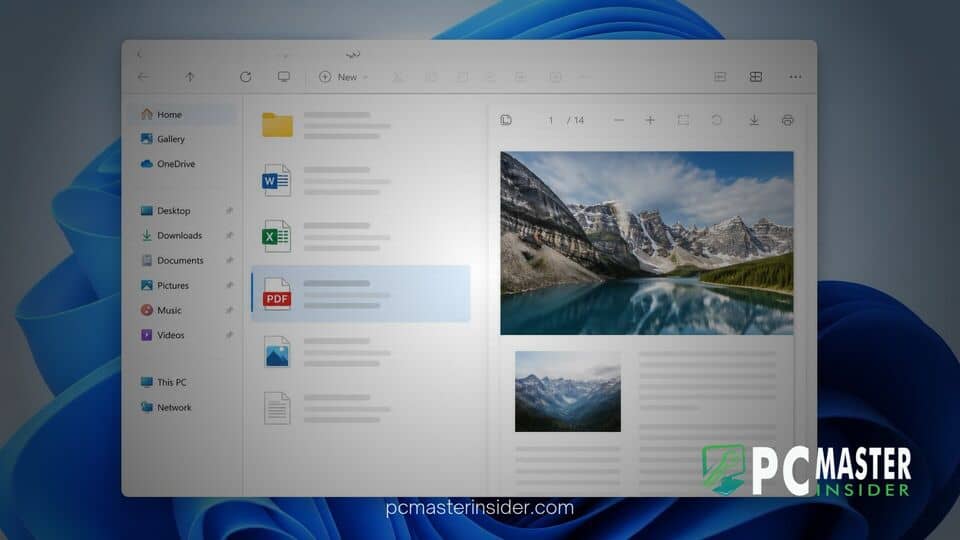
Microsoft is rolling out an upgrade to the desktop interface in Windows 11, focusing on how users interact with digital documents. The built-in file manager now offers automated web PDF previews, allowing users to glance at online and downloaded PDF documents directly within the application window without relying on third-party viewer extensions.
This update builds on ongoing efforts to refine system tools, ensuring that document management remains fast, secure, and intuitive for everyday enterprise and personal workflows.
Automatic Web PDF Previews Introduced in File Explorer
The updated feature integration targets the Windows 11 File Explorer PDF preview pane, enabling instant visual rendering for PDF documents retrieved from online repositories or local directories. Rather than forcing users to launch dedicated browser tabs or standalone PDF applications, the side panel renders content dynamically as soon as a file is highlighted.
Supported File Formats and Preview Pane Functionality
The native preview engine leverages Microsoft Edge rendering technology in the background to handle complex document elements seamlessly. Key capabilities include:
- Multi-page navigation: Users can scroll through multi-page PDF documents directly within the pane sidebar.
- Embedded media rendering: Visual elements, vector graphics, and standard typography maintain formatting fidelity.
- Hyperlink support: Web links included within the PDF layout remain accessible without needing full document extraction.
- Low overhead: Background rendering consumes minimal system RAM compared to opening full desktop productivity suites.
Usability and Workflow Enhancements for Desktop Users
For professionals handling large volumes of digital paperwork, such as invoices, research papers, and technical manuals, file management efficiency relies on rapid document inspection. The automated integration reduces the number of open windows on desktop workspaces, streamlining navigation across complex folder trees.
According to feedback from early testing groups, reducing friction in file inspection directly improves productivity during administrative tasks. By eliminating load delays associated with external PDF tools, users experience a smoother workflow when organizing, renaming, or reviewing file collections.
Additionally, Microsoft has ensured that security protocols remain intact during rendering. Local sandboxing prevents potential web-based script exploits embedded inside unknown PDF files from running outside the isolated preview environment.
Insider Channel Deployment and Release Timeline
The enhanced preview features are currently circulating through Windows Insider testing channels. Testers on the Beta and Dev builds have received access to evaluate system performance and report rendering anomalies before broader deployment.
Microsoft plans to roll out these File Explorer refinements in upcoming cumulative servicing updates for Windows 11. End users can expect the automated preview engine to become standard functionality across regular retail installations once validation phases conclude.
This update reinforces Microsoft's commitment to making Windows 11 a more cohesive environment for daily productivity, seamlessly combining web technology with core system capabilities.



